// ==UserScript==
// @name         Amulyam All
// @namespace    http://tampermonkey.net/
// @version      0.1
// @description  try to take over the world!
// @author       You
// @match        http://www.amulyam.in/*
// @grant        none
// ==/UserScript==
function addGlobalStyle(css) {
    var head, style;
    head = document.getElementsByTagName('head')[0];
    if (!head) {
        return;
    }
    style = document.createElement('style');
    style.type = 'text/css';
    style.innerHTML = css.replace(/;/g, ' !important;');
    head.appendChild(style);
}
window.addEventListener('load', function() {
    if (!sessionStorage) {
        document.querySelector('.mfp-bg.mfp-ready').remove()
        document.querySelector('[class="mfp-wrap mfp-close-btn-in mfp-auto-cursor mfp-ready"]').remove()
    }
    var a = document.getElementsByClassName('jquery-adi light');
    if (a.length) a[0].remove();
    sessionStorage.a++;
    addGlobalStyle('.jquery-adi light {display:none; }');
    console.log('ADI Removed');
    var a = document.getElementsByClassName('jquery-adi light');
    if (a.length) a[0].remove();
    sessionStorage.a++;
}, false);

function eventFire(el, etype) {
    if (el.fireEvent) {
        el.fireEvent('on' + etype);
    } else {
        var evObj = document.createEvent('Events');
        evObj.initEvent(etype, true, false);
        el.dispatchEvent(evObj);
    }
}
(function() {
    'use strict';
    var a = window.location.href;
    var aa = window.location.href.split('?')[0];
    var _;
    _ = document.getElementById('dialog');
    if (_) _.outerHTML = '';
    _ = document.getElementById('mask');
    if (_) _.outerHTML = '';
    $(".trivia_ans_options").show()
    var sel = false;
    var adi = document.getElementsByClassName('jquery-adi light')[0];
    if (adi) adi.remove();
    if (sel) a = aa = '';
    console.log(a,aa);
    if (aa == 'http://www.amulyam.in/daily-login-credits.do') {;
    } else if (aa == 'http://www.amulyam.in/vocabulary.do' ||
               aa == 'http://www.amulyam.in/playTrivia.do' ||
               aa == 'http://www.amulyam.in/checkTriviaLinkCaptcha.do' ||
               aa == 'http://www.amulyam.in/checkVocabularyLinkCaptcha.do') {
        console.log('Else');
        _ = document.querySelector('.question_div p');
        if (_ || 1) {
            localStorage.a = _.innerText;
            document.forms[0].submit();
        }
    } else if (aa == 'http://www.amulyam.in/checkTriviaCaptcha.do' || aa == 'http://www.amulyam.in/checkVocabularyCaptcha.do') {} else if (a == 'http://www.amulyam.in/enterLWord.do') {
        console.log('Else 2');
        document.querySelector('#submit-word').value = localStorage.a;
        document.forms[0].submit();
    } else if (a == 'http://www.amulyam.in/showLWord.do' || a == 'http://www.amulyam.in/checkTrivia.do') {
        console.log('Else 3');
        if (document.forms[0]) {
            document.forms[0].word.value=localStorage.a;
            document.forms[0].submit();
        } else {
            document.querySelector('.amu_trivia_content_part').scrollIntoView();
//             document.getElementsByClassName('trivia_ans_options')[0].children[0].click();
        }
    }
    else{
        console.log('FallBack');
    }
    // Your code here...
})();
Sunday, 10 June 2018
Auto Amulyam - TM
Amulyam

Recharge Ur Mobile With UR Luck
Lucky Recharge offers free prepaid mobile recharge on all operators across India. The recharge value varies between Rs.10 to Rs.100 based on the last 3 to 7 digits of your mobile number. Just enter your mobile number and check your luck for the day
Shortest Miner App - Earn Money by leaving your PC ON

Join on Shortest Now

Backup the config file and restore it anywhere
These keys ["GpuMining","GpuMode","CpuMining"] may differ
Config File Location : %LocalAppData%\ShortestMiner\x.y.z\config\config.json
Sample Config File:
{
  "Username": "cbc7bb0d8c3149ba91c07c603b2bbd15",
  "Machine": "home",
  "License": true,
  "LicenseVersion": 6,
  "Lang": "en",
  "Currency": "USD",
  "StartMiningWhenIdle": true,
  "ShowMiningWindow": false,
  "MinimalizeToTray": true,
  "CloseOnExit": false,
  "AutoScaleBtc": true,
  "AutoStartMining": true,
  "DisableNotifications": true,
  "StartMinimalized": true,
  "GpuMining": false,
  "GpuMode": "Comfort",
  "CpuMining": true,
  "CpuThreads": 2,
  "DisableAnimation": true,
  "EstimatedEarningPeriod": "Month"
}
PhonePe - Instant money Transfer
Use PhonePe for instant bank transfers & more! Earn up to Rs.1000 on your first money transfer on
Download Now
Wednesday, 15 November 2017
Earn upto 9000 in Google Pay App..!
Send money home to your family, split a dinner bill with friends, or pay the neighbourhood chaiwala. Make all payments big or small, directly from your bank account with Google Pay, Google’s new digital payment app for India.
Requirement:
1. Bank Account
2. Android or IoS Mobile.
3. The number which is register in the bank must be in the same mobile.
Step 1:
Install the App from the given link


Step 2:
Select the Language:

Step 3:
Enter your mobile number which is linked with Bank account.

Step 4:
Click the 3 dot in the top right corner, enter the referral code : 86il4c
Note: Without entering referral code, you won't get 51 rs for your 1st transaction.

Step 5: Add your bank account.
Click New under the Payment section. Select any one of the transfer option. (Account &ISFC or UPI). There you can find add bank option. Select the sim (which is linked with bank). Select the bank in the given list. Enter add your bank details.(Last 6digit atm number).


Requirement:
1. Bank Account
2. Android or IoS Mobile.
3. The number which is register in the bank must be in the same mobile.
Step 1:
Install the App from the given link
Step 2:
Select the Language:
Step 3:
Enter your mobile number which is linked with Bank account.

Step 4:
Click the 3 dot in the top right corner, enter the referral code : 86il4c
Note: Without entering referral code, you won't get 51 rs for your 1st transaction.

Step 5: Add your bank account.
Click New under the Payment section. Select any one of the transfer option. (Account &ISFC or UPI). There you can find add bank option. Select the sim (which is linked with bank). Select the bank in the given list. Enter add your bank details.(Last 6digit atm number).

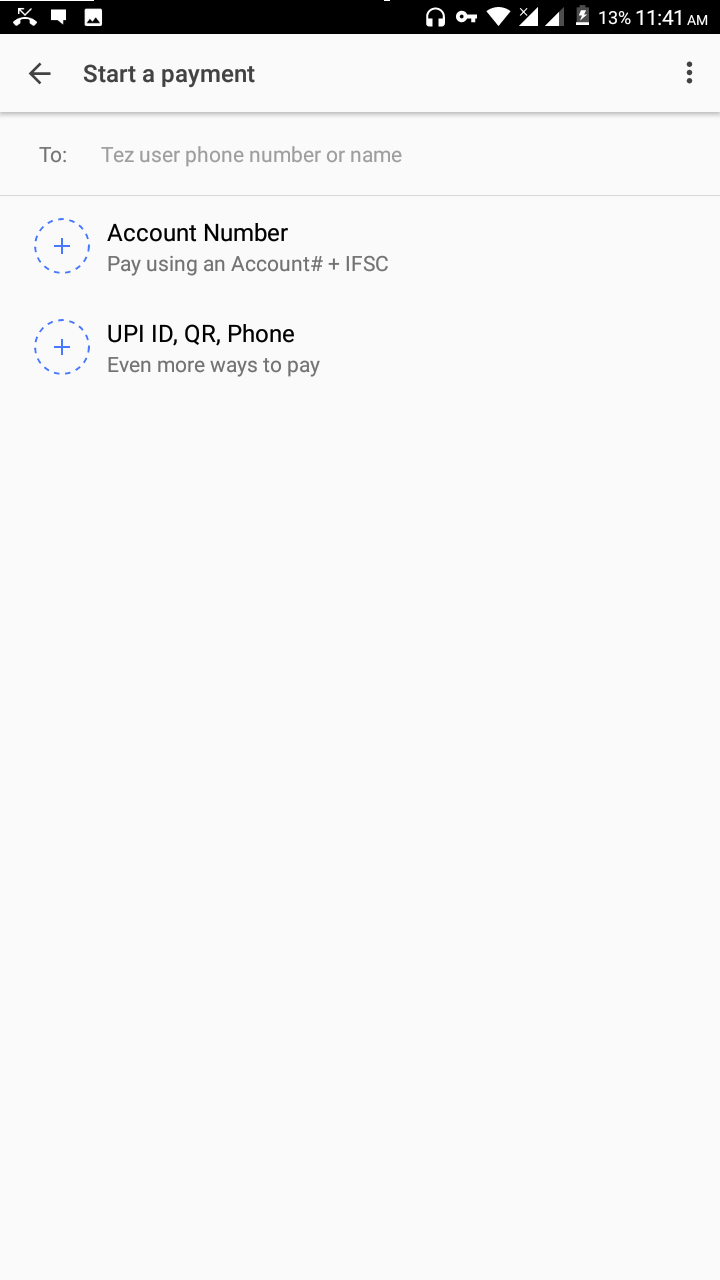

Final Step:
Enter your friend's account number or UPI id or mobile number and send minimum 100 rs.After sending you will get your cashback.
Subscribe to:
Posts (Atom)